
Overview
The CLASSIC.COM API gives authorized partners programmatic access to the data that powers CLASSIC.COM: one of the most comprehensive specialty car databases in the world. Rather than manually browsing the site, your platform or internal tools can pull vehicle data, search sales history, find comparable cars, and generate embeddable market charts automatically.
API access is organized into three Licensed Data Bundles, each corresponding to a progressively deeper level of data access.
Table of Contents
-
Bundle 1: Market Widget Creation via Taxonomy (Access Level 1)
-
Bundle 2: Vehicle Taxonomy (Access Level 2)
-
Bundle 3: Sales History (Access Level 3)
-
Best Practices
-
Getting Access
- Documentation
Bundle 1: Market Widget Creation via Taxonomy
What It Does
This bundle gives you the ability to programmatically generate embeddable market chart widgets for any vehicle in the CLASSIC.COM database. These are the same charts you see on CLASSIC.COM market pages — live, data-driven sales history charts that you can embed directly on your own website or platform.
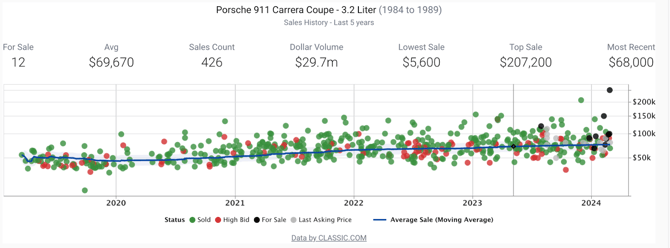
A widget displays 5 years of sales history for a specific vehicle market, including sold prices, asking prices, high bids, and a moving average trendline. The chart also shows summary statistics at a glance: number of cars currently for sale, average sale price, total sales count, dollar volume, lowest sale, top sale, and most recent sale.
How It Works
You call the API with a vehicle description, and CLASSIC.COM returns a ready-to-use embed code (an <iframe>) that you drop into your page. The chart is hosted on CLASSIC.COM and loads automatically.
You can specify the vehicle in two ways:
Using names — Provide the make, model, and any available details: year, generation, variant, trim. For example, to generate a widget for a 1986 Porsche 911 Carrera G-Body, you would pass: Year: 1986, Make: Porsche, Model: 911, Generation: G-Body, Variant: Carrera.
Using taxonomy IDs — Once you've explored the vehicle taxonomy (Bundle 2), you can use CLASSIC.COM's internal IDs instead of names for more precise results.
Using a VIN — When a VIN is available and exists in the CLASSIC.COM database, passing it is the recommended approach. The API will use the VIN to identify the specific vehicle and generate the most accurate market match possible.
What the Embed Looks Like
The embed code is a single line that renders a full chart in your page:
<iframe src='https://www.classic.com/widget/[hash]/' width='100%' height='480' style='border:0;'></iframe>The charts generated look like:
What You Receive
Along with the embed code, the API returns some about the market that was matched to your input — including the widget's unique ID, the domain it's registered to, the vehicle year, and whether a VIN was used. This lets you verify the widget was generated for the right car before publishing it.
If the Widget Doesn't Match the Right Vehicle
If the chart appears to be showing the wrong market, the most likely cause is that the input wasn't specific enough. Add more detail — generation, variant, trim, and year. When in doubt, passing a VIN eliminates ambiguity entirely, provided the vehicle is in the CLASSIC.COM database.
Return to table of contents ↩️
Bundle 2: Vehicle Taxonomy
What It Does
This bundle gives you access to CLASSIC.COM's proprietary vehicle classification system — a structured, hierarchical library of every make, model, generation, variant, trim, and engine in the collector car world.
The taxonomy is the foundation that makes precise vehicle identification possible. It solves a persistent problem in the collector car space: there are many ways to refer to the same car, and many cars that share names but are meaningfully different. The taxonomy maps all of it to a single, unambiguous structure.
The Taxonomy Hierarchy
Every vehicle is classified using 5 hierarchichal levels + powertrain (engine details). From the broadest level down to the most specific:
Make → Model → Generation → Variant → Trim + Engine
Two examples using Porsche and Ford taxonomies:
|
CLASSIC.COM TAXONOMY - VEHICLE CLASSIFICATION SYSTEM |
|
|
Make: Porsche Model: 911 / 356 / Cayenne / Boxster / etc. Model Generation: 964 / 993 / 996.1 / 996.2 / 997.1 / etc. Model Variant: Carrera 2 (C2) / Carrera 4 (C4) / Turbo / etc. Trim: Clubsport / Flachbau / Lightweight / etc. Powertrain: 3.6L H6 / 3.6L H6 (X-51) Taxonomy object relations |
Make: Ford Model: Mustang / Bronco / Escort Model Generation: 1st (‘65-’66) / 1st (‘67-’68) / etc. Model Variant: GT / Base / Mach 1 / Boss / etc. Trim: California Special / Boss Shinoda Powertrain: 5.0L V8 Taxonomy object relations |
What Each Level Means
Make — The manufacturer (Porsche, Ferrari, BMW, Ford, etc.).
Model — The nameplate under that manufacturer, with an overall production year span (e.g., the Porsche 911 runs from 1965 to present).
Generation (Model Generation) — A distinct production era within the model's life, typically representing a significant mechanical or design update. For the 911, this includes generations like the G Body, 964, 993, 996, 997, 991, and 992 families — each with its own year range and set of available variants and engines.
Variant (Model Variant) — A specific series within a model, such as GT3, Turbo, Targa, or Carrera. A variant can span multiple generations, and each carries its own year ranges and list of available trims and engines.
Trim — The most granular factory differentiation: a specific configuration or special edition within a variant (e.g. Touring, Clubsport, 40th Anniversary).
Engine (Powertrain) — The engine configuration, described by displacement, layout, and any factory designation (e.g., 4.0L Flat-6, 3.3L Turbo Flat-6, 3.6L H6 X-51).
Why This Matters for Partners
Precision matters in classic car valuation. A 991.2 GT3 Touring is a meaningfully different car from a 991.2 GT3 Standard — different rarity, different demand, different price. The taxonomy lets you query at exactly the right level of specificity across all subsequent API calls.
For production integrations, we recommend using taxonomy IDs (stable internal identifiers) rather than plain text names, which can be ambiguous. You look up the IDs once using the taxonomy, then reference them in all your downstream queries.
Return to table of contents ↩️
Bundle 3: Sales History
What It Does
This bundle provides access to CLASSIC.COM's sales history database — up to 5 years of vehicle listings and auction results, queryable using taxonomy classification and vehicle attributes. It covers listings from auction houses, dealers, and online platforms tracked by CLASSIC.COM.
How You Can Search
By keyword or VIN — Enter a free-text search term or a specific Vehicle Identification Number (or chassis/serial number). Best for exploratory searches or when you have a specific car in mind.
By taxonomy name — Search using make and model names, with optional generation, variant, trim, engine, body style, transmission, and doors. Requires at minimum a make and model name. Good for quick integration before taxonomy IDs are resolved.
By taxonomy ID — The most precise method. Uses CLASSIC.COM's internal taxonomy IDs for unambiguous results. Recommended for production use once IDs are resolved.
By price range — Retrieve all vehicles sold or listed within a specified USD price range, with optional date filters. Useful for market segment analysis or surfacing inventory across a price band.
All search methods support filtering by listing source (all listings, live auction events only, or online-only listings), by sale type (all, auction, or fixed-price), and by date range.
What Data Is Included
Sales History results include two categories of data:
Vehicle Attributes
- Body style (Coupe, Hatchback, Wagon, Pickup, SUV, etc.)
- Number of doors
- Handedness / driver side (LHD, RHD, Center)
- Transmission type (Automatic, Manual)
- Originality / Conservation Status (Original & Highly Original / Restomod & Custom / Project / Modified)
- Exterior color and interior color (broad categories: Red, Black, Silver, Gray, Beige, White, Brown, etc.)
- Drive type
- Title status (Lemon Law, Salvage, State VIN, etc.)
- Engine swap flag (Yes/No)
- Mileage (with unit and TMU flag for total mileage unknown)
- VIN
Listing-Related Fields
- Location: city, state, country, continent, and coordinates
- Listing type: Dealer, Auction, or Extended
- Price: bid prices and asking prices, in original currency and USD
- Lot date: auction close date or last updated date
- Status: For Sale, Sold, Not Sold (High Bid), Withdrawn, etc.
- Primary listing image
You can find out more in the API documentation for the specifics of what is returned in the vehicle objects.
Return to table of contents ↩️
Best Practices
Bundle 1 — Widgets: Always include a VIN when available. It produces the most accurate market match. When using names instead of IDs, be as specific as possible — include generation, variant, trim, and year to avoid the widget matching a broader or incorrect market.
Bundle 2 — Taxonomy: Traverse the hierarchy top-down (Make → Model → Generation → Variant) to resolve IDs before making downstream queries. Do this once as a setup step and store the IDs for reuse. IDs are stable and will not be affected by naming variations or formatting differences.
Bundle 3 — Sales History: Use taxonomy ID-based searches in production for the most precise results. Apply date range filters to scope results to a relevant time window — a 2–3 year lookback tends to reflect current market conditions for most collector car segments. Use name-based searches for prototyping and integration testing before IDs are resolved.
Return to table of contents ↩️
Getting Access
The CLASSIC.COM API is available to authorized third-party partners. Access is granted on a per-integration basis, with bundles licensed according to your use case. To inquire about API access or discuss integration options, contact the CLASSIC.COM at datasupport@classic.com.
Documentation
The CLASSIC.COM API documentation is available at this link.