
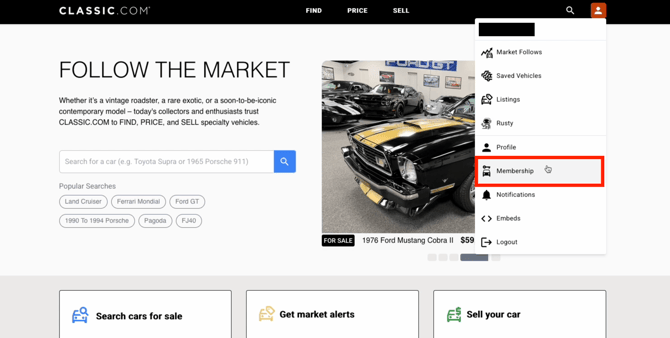
1. Access your Membership Management page here. This page can also be accessed in the top-right menu on any page. Select Membership from the dropdown menu.
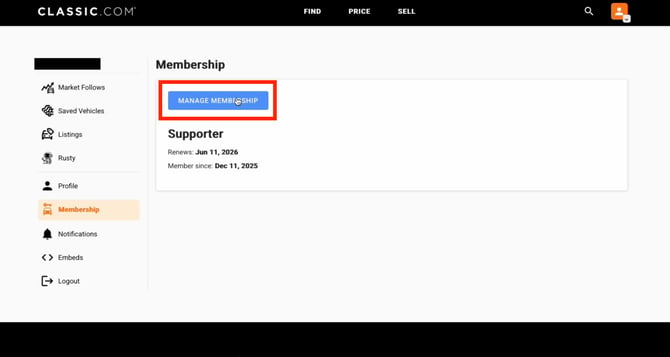
2. On the Membership page, you'll see your current plan, renewal date, and membership start date. Click the Manage Membership button.
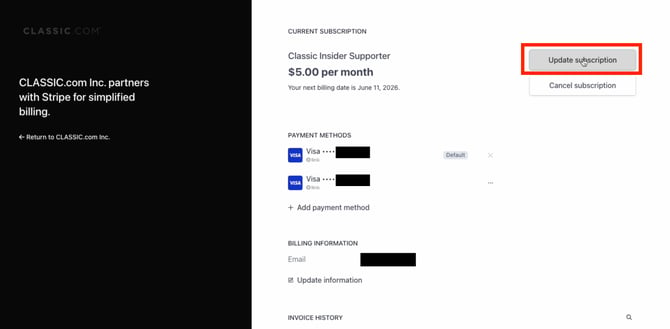
3. This opens your billing portal, powered by Stripe. Here you can see your Current Subscription, payment methods, and billing information. Click Update subscription to change your tier.
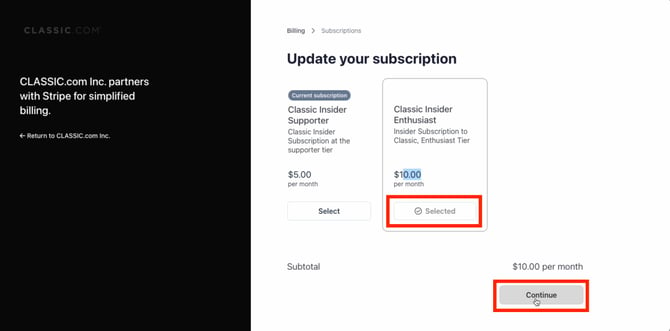
4. The next screen shows all available tiers. Your current plan is labeled "Current subscription". Select the tier you'd like to switch to. It will show as Selected once chosen.
Note: The subtotal will update to reflect the new pricing before you proceed.
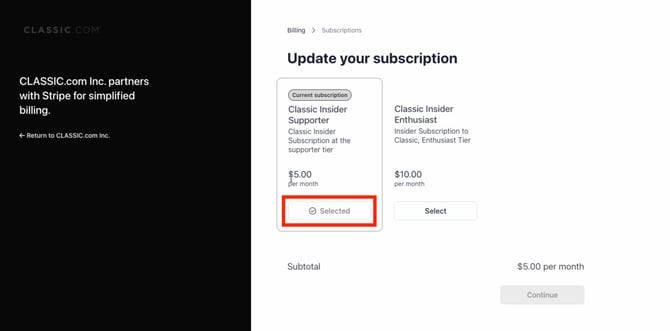
5. Once you've selected your new membership tier and reviewed the subtotal, click Continue to confirm the change.
Note: Upgrades take effect immediately. Downgrades are applied at the end of your current billing cycle. You'll keep access to your current tier's features until then.
If you have any questions about your Insider membership, our team is here to help. Reach out to us at pitcrew@classic.com.