
As a Verified Seller on CLASSIC.COM, every phone lead matters. Your dedicated tracking number makes it easy for serious buyers to reach you directly — and gives you visibility into every call. Here's everything you need to know about how it works.
How It Works
When you become a Verified Seller on CLASSIC.COM, a unique tracking number is assigned to your dealership or business and displayed on your public Verified Seller page. When a buyer calls that number, the call is automatically forwarded to the phone number you provided to our Partner Support team. Before you answer, you'll hear a brief whisper message - "This call is a lead from CLASSIC.COM" - so you always know where the call is coming from.
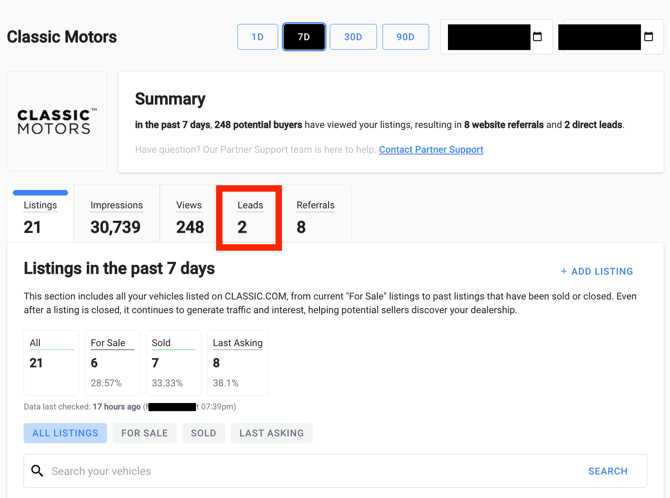
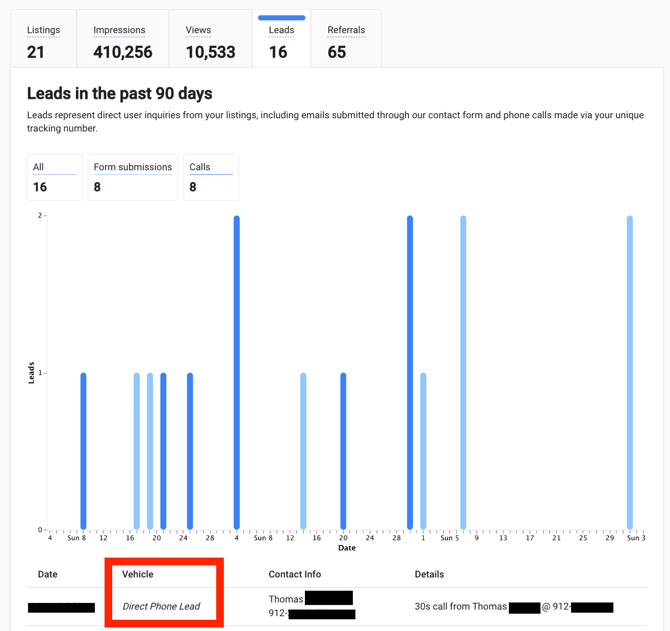
All incoming calls are logged in the Leads section of your Partner Dashboard, where you can see the date, call duration, caller name, and the number they called from.
Frequently Asked Questions
Why does the phone number on my CLASSIC.COM page not match our actual number?
The number displayed on your Verified Seller page is a CLASSIC.COM tracking number — not your direct line. This is intentional. It allows us to log and attribute phone leads to your account, giving you visibility into buyer activity. All calls made to that number are automatically forwarded to the phone number you've provided us.
How can I tell who called us?
In your Partner Dashboard, navigate to Leads. Any phone call will appear as a Direct Phone Lead and include the caller's name (as provided by their phone carrier), their phone number, the date of the call, and the call duration.
How can I listen to messages left by a buyer?
CLASSIC.COM does not record calls or store voicemails. If a buyer left a voicemail, it will be saved on the voicemail associated with the forwarding number you provided us - your dealership's office line, sales department, or cell phone, for example. Check the voicemail on that number directly to retrieve any messages.
💡 Tip: There is no indicator in your Partner Dashboard that confirms whether a voicemail was left. If you see a very short call duration, it's worth checking your voicemail — the buyer may have left a message.
How can I tell which car the buyer is calling about?
At this time, all phone leads are tied to your Verified Seller account as a whole, not to a specific listing. In your Leads section, Direct Phone Leads will show "Direct Phone Lead" under the Vehicle column rather than a specific car. If the buyer leaves a voicemail and mentions the vehicle, you'll be able to identify it that way. Otherwise, your team will know from the conversation itself.
We've heard this feedback from our partners and are actively working on a solution to tie calls to specific listings. Stay tuned for updates.
How do I update the phone number my calls are forwarded to?
If you need to change your forwarding number, email partnersupport@classic.com, and our Partner Support team will update it for you.
Have more questions? Our Partner Support team is here to help. Email Partner Support >